

HTML Input Color Picker (HTML5 Color Input)
Easily invoke the system color picker, respond to color changes in real-time, and offer color options to enhance user interaction.
In modern browsers, the HTML5 input has introduced the color attribute, allowing users to call the system color picker, making it a very convenient and cool feature.
Syntax
The color input is an implementation of HTML5, so it can only be used in browsers that support HTML5.
A typical usage is as follows:
<input type="color" value="#ff00ff">
Like other input types, the color, range, number, etc. depend on the browser; if the browser does not support color, the input above will display as a default text input box with the default value being "#ff00ff" in the value.
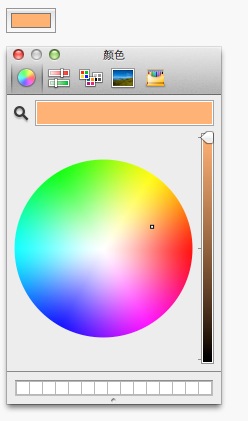 Click the image to view the DEMO
Responding to Color Changes
By simply using type="color", we can easily call the system color picker, and if we can monitor and respond to color changes, it will greatly enhance the user experience.
For example: HTML
<input type="color" value="#ff0000" id="bgcolor" oninput="changeBackground(bgcolor.value)">
JAVASCRIPT
function changeBackground(colorValue){
    document.body.style.backgroundColor = colorValue;
}
Color Options
Sometimes, providing a color palette alone is not enough; we need to give users several options to choose from easily.
At this point, we can use the datalist to achieve this requirement.
HTML
<input type="color" value="#333333" list="colors">
<datalist id="colors">
    <option>#ffffff</option>
    <option>#ff0000</option>
    <option>#ff7700</option>
</datalist>
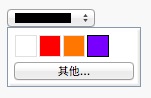 Click the image to view the DEMO
References
Keep Reading
Writing about Finland, life, and code. The next post goes straight to your inbox, without the noise.
Your feedback will help me write better posts—looking forward to it!