

Codex at $100/Month: How I Used It as a Software Engineer Over the Past Month
After upgrading Codex to the $100/month plan, I was not fully convinced myself. Then I looked through a month of history with it and realized the valuable part was not how much code it wrote, but how many unfinished things it helped me actually land in my projects.

I actually upgraded Codex to the $100-per-month plan.
A few months ago, I probably would not have believed this myself.
I have always been fairly open to paying for personal tools. $20 a month, I can understand. If it helps me look up fewer docs, write less boilerplate, and gives me a push when I get stuck, that price still feels normal.
But $100 a month is different.
That is no longer just "buying a handy tool."
It is expensive enough that I had to seriously ask myself: what exactly is this thing doing for me? Why is it worth $100?
So I did something very programmer-like.
I asked Codex to go through the past month of records with me.
Git history, tool calls, PRs, issues, worktrees, deploys, D1, npm. We went through all of it.
After that, my first reaction was: this thing might not be as simple as I thought.
1 month
5 personal project repos
461 commits
About 111 commits in mofei-life alone can be directly attributed to Codex PR workflows
290,314 lines added
244,371 lines deleted
534,685 lines of code churn
39,056 tool calls
500 subagent launches
98 high-level task records
35 categories of work
Of course, these numbers do not directly prove how much useful code AI wrote for me.
There are lockfiles in there. SQL. migrations. documentation. generated content. merges. deletions. refactors. Calling 534,685 lines of churn "534,685 lines of productivity" would be too empty.
But the numbers still made me pause.
Because they showed that, this month, Codex was not just adding a few lines inside one file. It had been mixed into my real projects, following me through development, refactoring, migrations, documentation, publishing, verification, and cleanup.
That was different from how I had imagined AI coding.
I thought it would mostly sit there and generate large blocks of code.
But the logs showed something else: reading files, finding context, checking diffs, running commands.
Why Did a Blog Become This Complicated?
This month, the commits were mainly spread across a few personal projects:
mofei-life          396 commits
mofei-dev-tools      30 commits
mofei-life-ui        20 commits
mofei-skills          9 commits
weird-skills-lab      7 commits
The biggest one was still mofei-life, my blog itself.
Nominally, it is a personal blog. But it has long stopped being just a place for articles. It now has web, admin, api, workers, D1, Cloudflare, comments, subscriptions, images, search, and a pile of old migrations.
Sometimes I look at this repo and think: why did I turn a blog into this?
Then, one second later, I continue adding things to it.
In that repo, there were 396 commits this month. 108 of them were merge commits. Among those, 68 merge commits clearly carried Codex branch or PR traces, corresponding to about 111 deduplicated branch commits.
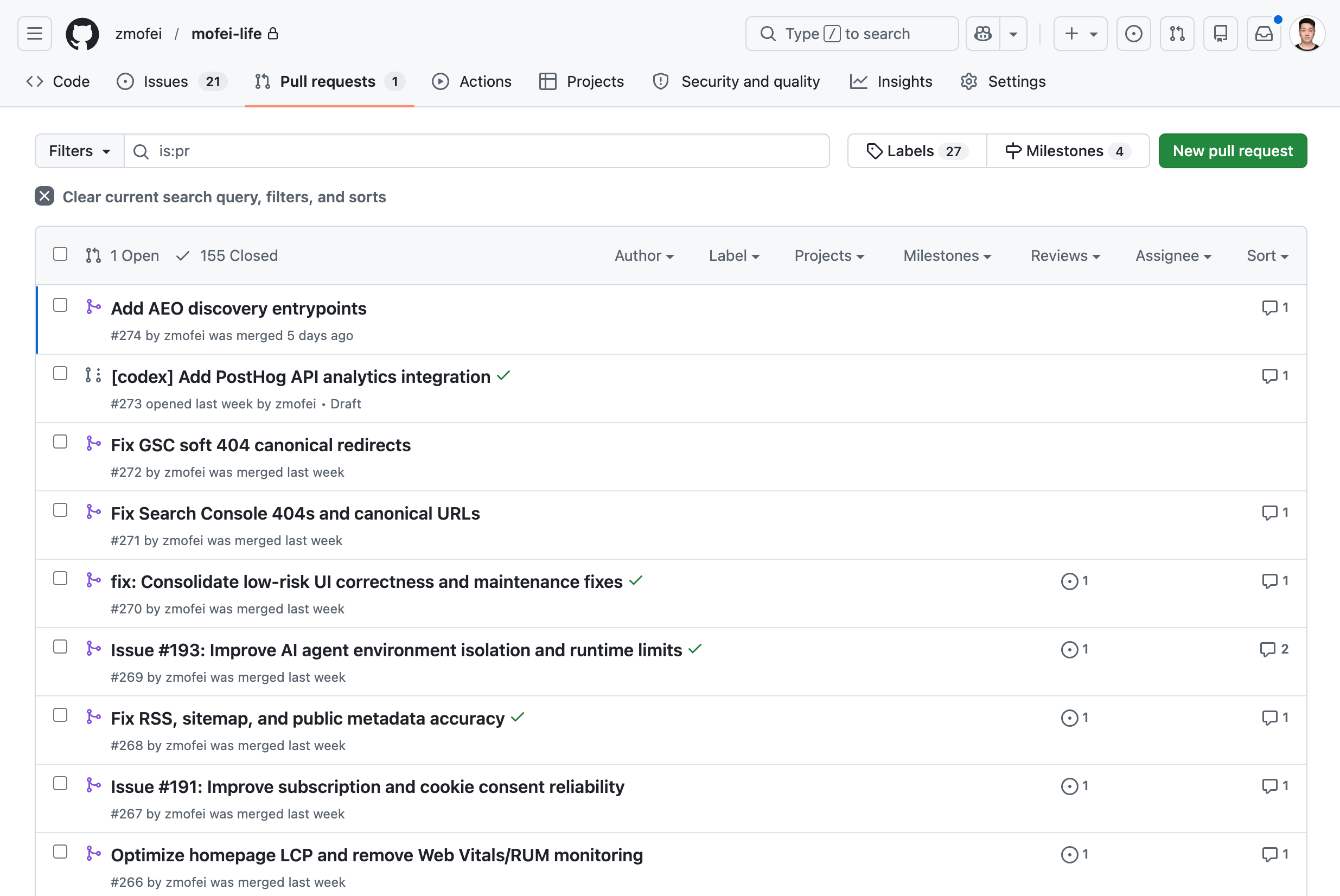
GitHub commit history / PR list - Codex working hard and opening all kinds of PRs
After removing merges, there were still 288 non-merge commits. They were not concentrated in one big feature. They were scattered across many annoying small places: the website, admin, SEO/AEO, privacy, comments, visual stories, deployment regressions, content cleanup.
None of these tasks look like a big project by themselves.
But they eat time.
For example: Search Console reports a canonical issue, so I need to check it. Old URLs need handling. Soft 404s need checking. Middleware, sitemap, robots all need to be compared. Cookie consent receipts need to go into D1. PRs need review. Tests need to run. Cloudflare checks need waiting. Production smoke checks still need confirmation.
These things are not hard.
Really, they are not hard.
But you have to finish them one by one.
It was not that I did not know how to do them before.
Many times I would just open the computer, look at an issue, look at an error, look at a few half-open GitHub tabs, and say to myself: forget it, next time.
Sometimes it was not that I did not want to do it.
It was just that the time I had was not quite enough to get into the whole problem.
Now some of that feels different.
I can throw the problem to Codex first and let it read the code, find the context, and run whatever can be run. When I come back, at least it is no longer a blank page.
Maybe it is just a small diff.
Maybe it is a failed test result.
Maybe it is a PR, or a migration.
None of these are huge.
But they really do stay in the project.
That matters to me.
The Things Left Behind in Mornings and Evenings
Later I looked at the time distribution.
Out of 461 commits, 369 happened during weekends, mornings, or evenings. About 80%.
08:00   59 commits
22:00   40 commits
21:00   37 commits
07:00   32 commits
09:00   32 commits
20:00   24 commits
23:00   24 commits
When I saw this distribution, it looked exactly like me.
A little time after waking up.
A little time after the kid has gone to sleep.
If I am lucky, a larger block of time on the weekend.
Those pockets of time existed before too, but they were often awkwardly fragmented.
It is not that you cannot do any work in them.
But they are often just not enough for me to take a problem from start to finish.
Now those fragments of time are more likely to turn into something real.
Sometimes it is just one commit.
Sometimes it is closing an issue that had been hanging around for a long time.
Sometimes it is simply asking Codex to investigate first, and it comes back to tell me: this is not a code problem, it is an environment or configuration problem.
That is much closer to the value I actually felt than "AI writes code fast."
It Looks Like a Very Diligent Person in the Terminal
The thing that surprised me most was the tool usage.
This month, Codex's tool calls were a little ridiculous:
tool calls:     39,056
terminal commands: 33,253
subagent launches:   500
wait agent:          410
close agent:         252
The most common command patterns were:
sed        13,351
git         6,425
rg          4,694
pnpm        2,884
gh          1,696
wrangler    1,413
node          739
curl          225
I looked at this set of numbers for quite a while.
Because it did not look like "AI writing code."
It looked more like a very diligent person working in the terminal.
First use rg to find clues.
Then use sed, nl, and cat to read context.
Then use git diff, git status, and git show to inspect changes.
Then run pnpm test.
Then use gh to check PRs, update issues, and wait for checks.
When needed, use wrangler to check Cloudflare, run D1, and verify production. Yes, I am a shameless Cloudflare fan.
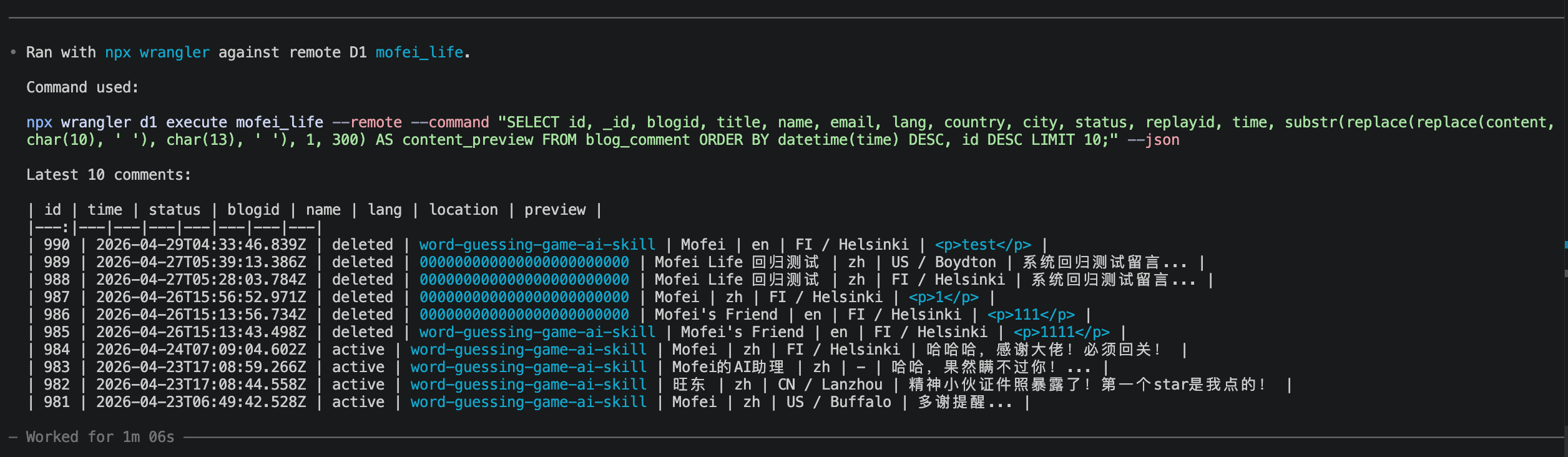
Codex can inspect my staging data to help itself with other tasks
In the past, I often asked AI: "Help me write this function."
Now I more often say: "Handle this problem, verify it, and then tell me."
Writing functions is useful too.
But honestly, I need the second kind more now.
April 26 Was a Bit Absurd
The most exaggerated day this month was 2026-04-26.
There were 124 commits that day.
The number alone looks absurd. But when I looked back at what happened that day, it was not a day of nonstop feature work.
That day, Codex handled a lot of engineering chores inside mofei-life:
milestone
issue
PR linkage
Project v2 fields
postdeploy workflow
smoke test
merge
tag
review
conflict resolution
These things used to easily become a pile of half-open GitHub tabs.
I knew they should be handled.
But they did not always have a clear force pushing them into "do it now."
Codex is very suitable for this kind of work. It can check one thing after another, change one thing after another, verify one thing after another, and then push the status back to GitHub.
That day made one thing very clear to me.
When you are doing personal projects alone, the most tiring part is often not the idea, and not the code.
It is the engineering cleanup that nobody else is there to finish for you.
I Started Writing Rules for It
There was another change this month that I would not have expected before.
I started maintaining AGENTS.md seriously.
In the past, managing a project mostly meant managing the code itself: how directories are organized, how APIs are designed, how tests are run.
Now I also have to manage "how AI should work."
Which commands it must not run randomly. When it must create a branch first. When tests are required. How PR descriptions should be written. Which directories should not be touched. When it should stop and ask me.
All of that has to be written down.
This is a strange thing.
I originally thought I was maintaining a blog.
Later I realized I was also maintaining an engineering assistant that can work, but needs constraints.
UI Is the Clearest Example
UI was the best example of this change this month.
At first, the way I used AI for UI was very direct.
"This color is not quite right. Adjust it for me."
"This page does not look good. Improve it."
The result could of course get a little better.
But it was unstable.
Sometimes it would adjust things correctly. Sometimes it would suddenly switch to a different style. Sometimes one page looked fine, and another page drifted away again.
Later I started using design.md.
I wrote down rules for colors, spacing, hierarchy, buttons, cards, and page structure, and asked AI to read them before doing UI work.
After that, the results became much more stable.
At least it no longer behaved as if every page was a brand-new design exercise.
But design.md also had limits.
It could control direction, but not every detail.
AI knew the UI should be "clean," but when it came to a button hover state, a collapsed sidebar, or making a footer layout consistent across projects, it could still drift.
Things only started to stabilize when I extracted the UI into real components.
Then I no longer had to make AI understand from scratch what "my UI should look like" every time. It could work inside existing components and constraints.
Codex eventually pushed this line all the way into an independent repo, npm publishing, dev dist-tags, production releases, Trusted Publishing, README, docs/API.md, consumer fallback tests, and web/admin consumer migration.
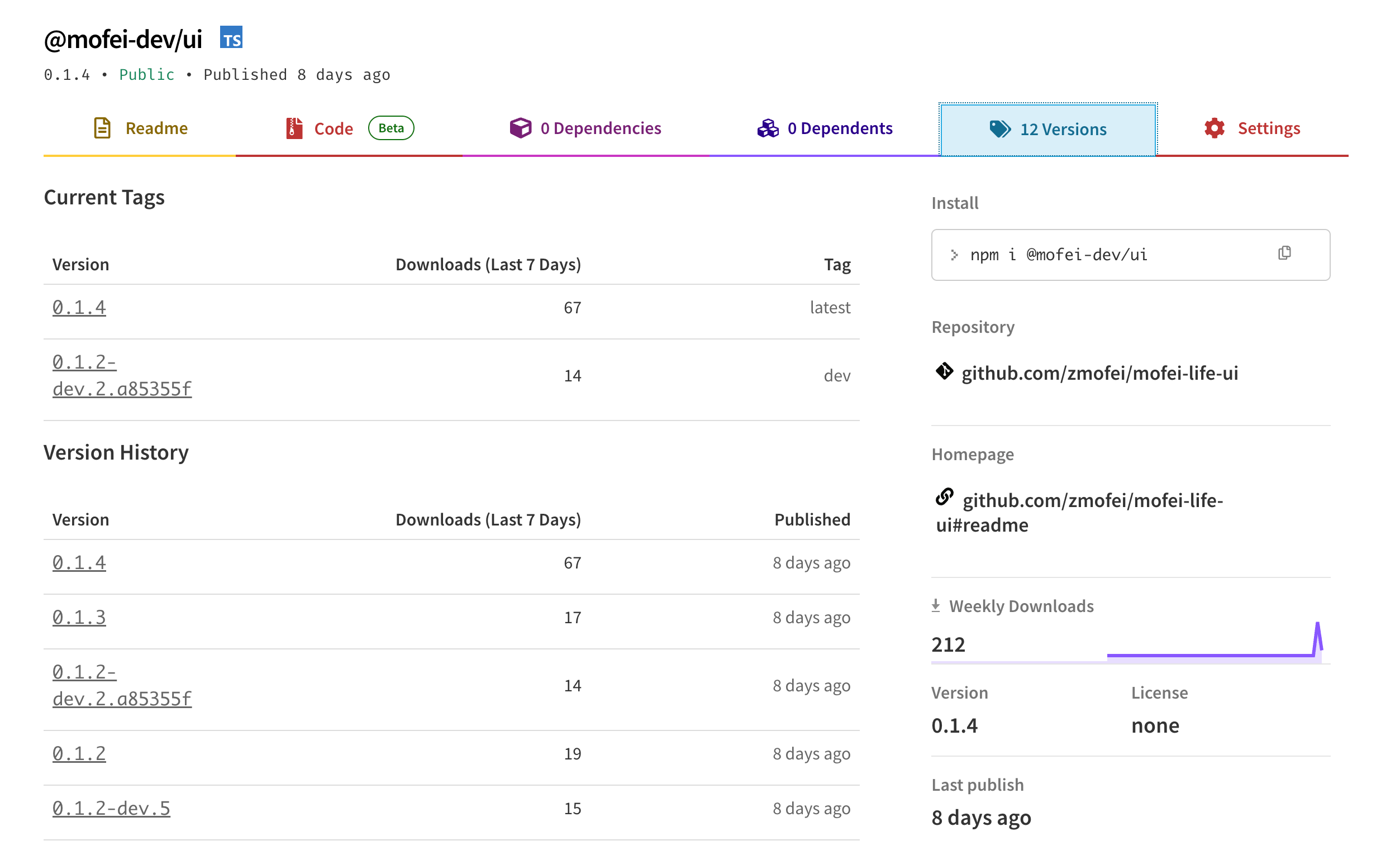
Codex even helps me manage my UI npm package. It even knows about the dev tag and latest tag.
The most valuable part here was not simply "it got published to npm."
The most valuable part was that it filled in mechanisms that make things less likely to break later.
For example, shared UI can look fine inside a local workspace, but once it is published as an npm package, the consumer project may not generate the same Tailwind classes. Codex later added fallback tests to make sure key layouts like the footer, nav, and AI chat dock do not break in consumer environments.
That made me realize that AI UI work cannot rely on one sentence like "make it look better."
You have to write some of the things that used to exist only as taste into rules it can execute.
For example: which parts must not be changed randomly, how components are reused, which states must be preserved, and whether the consumer project will still work after the package is published.
If I get the chance, I should write a separate article about how I moved from "asking AI to adjust colors" to "using AI to manage a UI system."
Later It Even Started Organizing My Files
There were also a few things this month that feel a little odd inside a technical article.
For example, I asked Codex to organize parts of my personal knowledge base and re-archive some materials that had been piled together for a long time.
This kind of work used to be something I would also drag out.
Filenames were inconsistent. Directories were casual. Things were mixed together. Every time I thought about organizing them, I would tell myself: forget it, I can still find them anyway.
But Codex is quite good at this kind of work.
It does not get annoyed.
I can ask it to scan a directory, group things by their existing content, give them clearer names, and then list the changes back to me.
This is not coding.
But it is also very similar to coding.
At its core, it is still about taking a messy pile of things and making it a little more orderly.
I Really Am Writing Less Code by Hand
Even writing this sentence feels a bit sudden to me.
But during this period, I really have been writing less code by hand.
That does not mean I read less code.
I read more.
Only the way I read has changed.
I now spend more time reading diffs, test results, PR descriptions, and checking whether Codex misunderstood me, touched files it should not have touched, or treated an environment problem as a code problem.
Before, when a problem came up, I would go in and write the fix.
Frontend, backend, scripts, bugs, deployment. If it could be fixed, I would fix it.
To put it bluntly, I was an IT laborer.
Now sometimes I have a strange feeling: I have gone from IT laborer to IT contractor.
That wording is not very elegant, but it is accurate.
I did not actually become more advanced, and I did not stop writing code.
It is just that, many times, I first have to explain how far a task should go, which places must not be touched, and which checks count as done.
Then I let Codex do the work.
After it finishes, I come back and pick at the problems.
This process is not as easy as it sounds.
Sometimes reading its diff is more tiring than writing the code myself.
When I write the code myself, the mistakes are usually mine. When I read code written by Codex, I first have to decide whether it understood me at all.
I now spend noticeably more time thinking about "should this code exist?"
That might be the strangest part.
The code no longer feels like something I typed line by line.
But I am still responsible for it.
So Where Is the $100 Worth It?
If it is only for code completion, it is not worth it.
At least not for me.
But if, like me, you have a pile of personal projects, tools, blog work, documentation, publishing flows, and file systems that have been waiting for someone to move them forward, then what you are buying is a little different.
It does not think up some grand direction for you.
It is more like pushing things forward until they reach a place you can check.
One commit.
One PR.
One test result.
One D1 migration.
One npm version.
One README.
One smoke check.
One cleaned-up directory.
None of these sound particularly impressive, but they stay in the project.
What I remember most from this month is not "AI writes code fast."
It is that I paid $100 for something and eventually realized I was not buying a coding assistant.
I was slowly training a personal engineering system.
It cannot replace a programmer.
But it can push the programmer out of some execution details.
The condition is that you have to know how to manage it.
Of course, it is still a bit expensive.
Keep Reading
Writing about Finland, life, and code. The next post goes straight to your inbox, without the noise.