

When Codex Can Do the Work but Can’t Finish It: Turning a Stalling Task into a Resumable Workflow
Why can AI do the work but not finish it? This post explains how to turn a stalling Codex task into a sustainable, resumable workflow.
This time, what stopped me was not image understanding itself.
What stopped me was a task that could already run, but kept stopping halfway through.
I was working on something pretty specific: taking a large set of images that already existed in my system, running image understanding on them in a stable way, and writing the results into a separate AI metadata database so it could later feed article-level AI summaries.
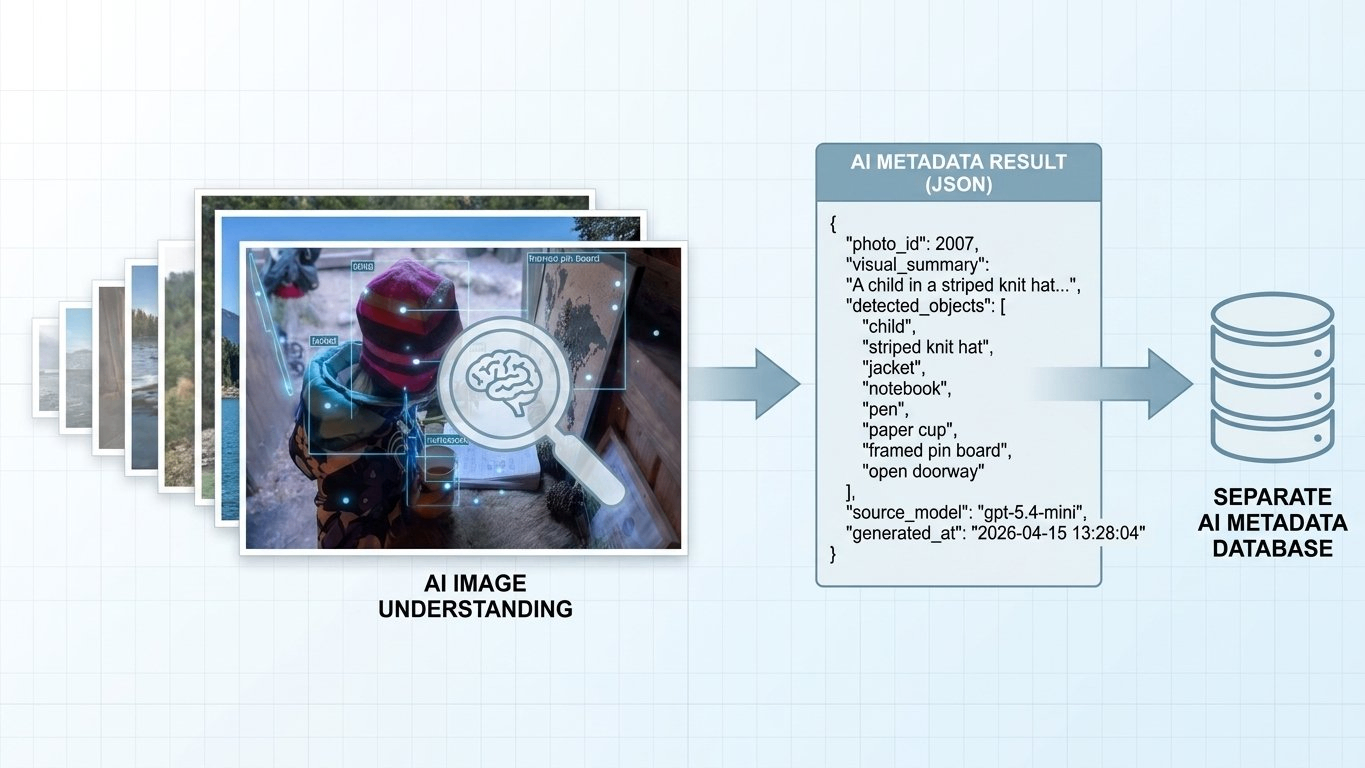
When I tested it with just a few images, it looked fine. Codex could read the images and return useful results.
But once the volume went up, the problem changed. It could do the job, but only for a while. Maybe 5 minutes. Maybe 10. From the outside it looked like the system was still working, but the backlog was not moving forward in a stable way. A lot of the time I still had to step in and nudge it again.
That was the moment when I realized the real problem was not image understanding.
The real problem was progress.
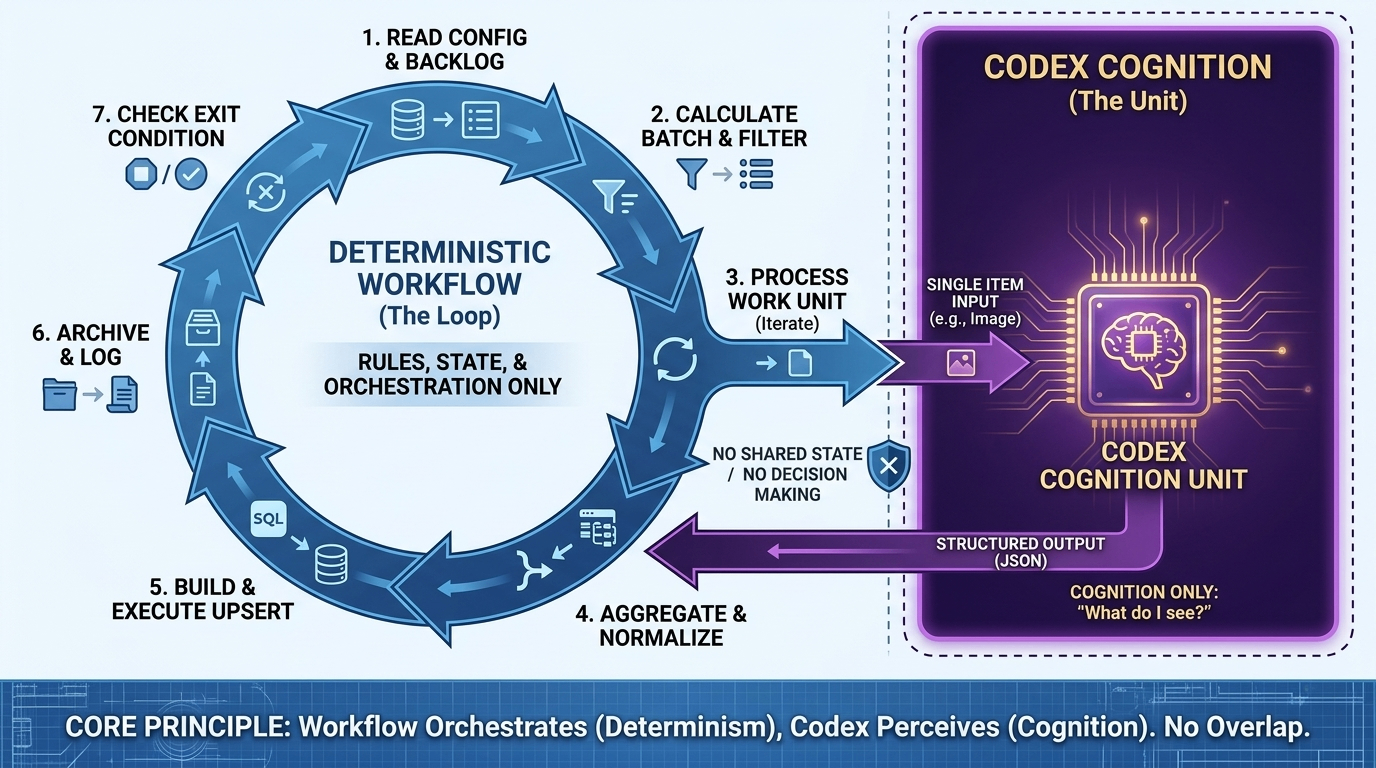
This article is about how I changed the setup from “let Codex handle the whole long task” into “let the workflow own orchestration, and let Codex handle only the smallest cognition step.” After that change, the whole thing finally behaved like a real loop: it could keep going, stop, resume, and stay inspectable.
The Real Problem
If you describe this feature at a high level, it sounds very simple:
“Take the images that haven’t been processed yet, let the model look at them, and write the results back.”
But at the system level, what I actually needed was this:
- every input eventually gets processed
- both success and failure leave a record
- the task can stop and resume
- the backlog keeps moving forward
- the system knows when it is done
At that point I stopped thinking of it as “maybe the prompt still needs work.”
It was an execution problem.
The First Mistake
My first instinct was very straightforward.
If Codex could read images, call tools, and write code, why not just give it the whole job?
So I let it handle all of this:
- checking which records were still unresolved
- splitting batches
- fetching remote resources
- organizing the returned results
- generating the write payload
- writing back to the database
- deciding whether to continue with the next round
At first glance, that sounds like the easiest setup.
If the model is strong enough, the laziest instruction is just:
“Finish this batch.”
But once it started running for real, I slowly stopped trusting that setup.
It was not always failing with some dramatic error. That would actually have been easier. The worse problem was that once the result looked wrong, I could no longer tell where things had gone off track. Was the model wrong? Did a tool call fail? Did the execution path drift somewhere in the middle?
And honestly, the whole thing had become a black box.
It could start doing the work, but it behaved more like a long interactive session than a stable workflow. As soon as the task became long-running, and as soon as it had to keep real backlog state moving forward, things got shaky.
When I looked back at it later, the problem was not mysterious at all.
I had forced three different responsibilities into the same executor:
- looking at the image and understanding it
- calling tools and reading or writing data
- managing progress, retries, and stop conditions
As long as those three layers stayed mixed together, the system was always going to be fragile.
Taking the Loop Back
The change that actually mattered can be summarized in one sentence:
The workflow owns orchestration. Codex owns cognition.
Everything else I changed came out of that line.
In practice, it meant this:
- the outer loop is controlled by deterministic code
- the model only handles one minimal work unit at a time
- rule checks live in code
- state transitions also live in code
After that, I stopped asking Codex to decide what should run next. I stopped asking it to hold global state. I stopped expecting it to push the whole backlog from start to finish on its own.
I only wanted it to answer one question that it is actually good at:
“What am I seeing here?”
Once that boundary became clear, the system became much calmer.
The Structure I Kept
What I kept in the end was not a “big agent.”
It was a split-out file structure.
It looked roughly like this:
scripts/loop/
  README.md
  item_ai/
    README.md
    run_loop.sh
    single_item.prompt.md
    result.schema.json
    build_upsert_sql.mjs
    .logs/
The important part is not the directory shape itself. The important part is ownership:
run_loop.shpushes the outer loop forwardsingle_item.prompt.mdhandles one work unit onlyresult.schema.jsonconstrains the output shapebuild_upsert_sql.mjsturns results into something actually writable
I still like this split a lot, because you can see where a problem lives. It is much easier than stuffing all the control into one prompt.
How I Broke It Down
Cut One: Push the Task Back Down to a Minimal Work Unit
Before, the task I gave Codex was:
“Run the whole chain.”
Later, the task became:
“Process one input and return one structured result.”
If the input is one image, then the job is only this:
- read the image
- describe what is visibly there
- return structured JSON
Not this:
- decide whether it belongs in this batch
- decide whether this is the last round
- decide whether to retry
- decide when to write into storage
Once I made that cut, the system got much simpler.
The model was no longer responsible for the whole task. It only handled one work unit.
Cut Two: The Outer Workflow Should Only Do Deterministic Work
I made the outer script very narrow.
It only does these things:
- read config
- query the backlog
- calculate the current batch
- apply rule filters
- call Codex one by one
- aggregate results
- generate write content
- write into storage
- archive
- decide whether to continue
That layer does not need to be smart.
It needs to be predictable.
Because long-running systems do not survive on “intelligence.” They survive on much harder things:
- visible state
- clear boundaries
- recoverable failures
- explicit exit conditions
Cut Three: Put Rule Decisions Back into Code
Later I gave myself one very strict rule:
If it is a rule question, do not give it to the model.
For example:
- should this input be processed at all
- is this source allowed
- should this case be skipped or marked as failed
- what status should be written after a failure
All of that belongs in deterministic logic.
The model should only answer the part it is actually good at, which is the cognition part.
As soon as rule handling also gets pushed into the model, the system becomes noisy again.
Cut Four: Every Work Unit Gets Its Own Result
This helped a lot with debugging later.
Each processed input writes out its own result file. At the simplest level, it can look like this:
{
  "item_id": 1932,
  "status": "done",
  "summary": "...",
  "error": ""
}
That file does two jobs at once:
- machine-readable state
- human-readable record
A lot of AI workflows also write logs, but logs usually do not line up with the actual work unit.
The nice part about one result file per item is that you can open any one of them and instantly see:
- what object was processed
- what the current state is
- what the output looks like
- whether anything failed
That is much more useful than staring at one long stream of logs.
Cut Five: Normalize Once More Before Writing
I did not write the raw model result straight back into the database.
There is always one normalization layer in between.
For example, the main thread can fill fields like:
source_modelsource_versionreview_statusupdated_at
The value of this step is not that you “add one more layer.” The value is that the final write shape is still controlled by the system, instead of blindly accepting whatever the model happened to return.
That matters a lot later when you need to query the data, change fields, or deal with version changes.
Cut Six: Let the System Know When to Stop
A real workflow is not “let’s run a few more rounds and see.”
It needs explicit stop conditions.
The set I kept was simple:
- the backlog is empty
- the current batch is empty
- this round did not increase the processed count
- stalled rounds exceeded the threshold
- the maximum number of loops was reached
Without that, you still need a human to sit there and watch it.
And then it is not really a workflow. It is just a longer manual process.
How I Validate It
At this point I do not trust “the command exited without errors” very much.
If I want to know whether the loop really ran properly, I check at least four layers.
1. Did the Count Actually Move?
At minimum, I want two numbers:
- total count
- processed count
If one run looks like this:
- before:
366 / 786 - after:
370 / 786
then I know that round pushed four more items forward.
That is a lot more useful than saying “it looked busy for a while.”
2. Did Every Work Unit Leave a Result?
I at least check:
- the result file
- the raw model output
- the execution log
If the input had to be downloaded first, then I also check whether the local file was actually written.
3. Was Storage Really Updated?
This step is non-negotiable.
Do not trust the local output only. Do not trust “the SQL was generated.”
The real source of truth is still the storage layer at the end.
At minimum I check:
- primary key
- result fields
- error field
- model provenance
- version field
- status field
4. Did Archive and Active Run Data Actually Stay Separated?
This is easy to skip, but it affects maintenance a lot later.
What I want is:
- successful results go into archive
- debug material stays in the current run directory
That gives me two clear kinds of evidence later:
- archive for reviewing outputs
- current run data for debugging problems
If those two get mixed together, the whole system becomes harder to inspect as it grows.
What Codex Is Good For
This is also one of the clearest takeaways for me.
Codex is actually very good at helping me build the first version of a workflow. It is good at filling in scripts, schemas, folder structure, and README-style docs.
But I would not ask it to own these jobs:
- long-running backlog progression
- resume after interruption
- deciding whether the task is really finished
So yes, Codex is good at helping you write a workflow.
But do not mistake it for the workflow itself.
Those are two different jobs.
The setup that ended up feeling best to me was this:
First let Codex help generate the first structure. Then let that workflow call Codex one round at a time.
That way the two abilities stay separate:
- structure generation goes to the model
- long-running execution stays with the system
What I Still Would Not Overclaim
This article is about the success path that already runs.
But I do not want to write it as if every failure branch has already been fully exercised.
There are still at least two paths that I think deserve more deliberate fault injection:
- whether download failures are consistently written as
errorstates and then carried into later aggregation - whether non-compliant inputs are skipped correctly while still leaving an auditable record
Having those branches in the code is not the same thing as having really tested them.
So if you want to adapt this pattern to your own task, I would not stop at the happy path. I would inject failure on purpose at least once.
Final Thought
The biggest thing I got out of this was not “I made AI understand images.”
It was much simpler than that.
When Codex clearly knows how to do the work but still does not finish it, do not rush to give it a better prompt, more context, or more responsibility.
Take the loop back first.
Once orchestration moves back into the system, the whole chain usually becomes much steadier.
Keep Reading
Writing about Finland, life, and code. The next post goes straight to your inbox, without the noise.
If this post was helpful or sparked new ideas, feel free to leave a comment!